Related: Best Budget Mechanical Keyboards for Long Coding Sessions
A quiet mechanical keyboard setup is not a single purchase. It is a chain of decisions, and most people build that chain backwards: they buy the loudest board with the best reviews, then spend six months trying to make it stop annoying whoever is on the other side of the wall. I have been on both sides of that wall. My bench sits in the spare bedroom in Mueller, roughly eight feet from where I take on-call pages at 2 a.m., and every board that lands on it gets the same treatment: 30 days as my actual daily driver, one full on-call week included, a decibel meter at 40 cm, and a spreadsheet that passed 250 logged sessions this year.
That process is why this list looks the way it does. Two of the four picks are keyboards that stay polite after midnight, one is the wired board I hand to people who just want to type, and one is not a keyboard at all. The acoustic panels in the last section have done more for the noise level of my office than any switch swap I have ever soldered, and I say that as someone who genuinely enjoys soldering.
Best Overall: Keychron K2 75% Wireless Mechanical Keyboard
If you want one board that covers the most desks, this is the one I point people toward. The K2 is a 75 percent layout at 84 keys, which means you keep the function row and the arrow keys without giving up the desk space a full-size board eats. The spec sheet lists Bluetooth wireless, USB-C, white LED backlighting, anti-ghosting, and N-key rollover, and it ships in Mac and Windows versions, so the modifier keys match the machine you actually own instead of the one the factory assumed you had.
Two things matter more than the feature list. First, 75 percent is the layout I recommend to anyone who codes all day, because the arrow keys and the function row are the two things people miss most after they drop to a smaller board, and missing them is how a keyboard becomes a thing you notice at week three. Second, wireless that works is the difference between a board you use and a board you tolerate. Bluetooth implementations vary wildly, and this is the one I get the fewest complaints about from readers who bought it on my say so.
What I check before recommending any wireless board: does it hold a connection through a full work day with a laptop lid closed and a phone sitting on the desk, does it wake from sleep on the first keystroke or the third, and does the battery survive an on-call week of 140,000 keystrokes. Those questions decide whether wireless is a feature or a liability. The K2 is also the pick here if you switch between macOS and Windows, because the version you buy is set up for one of them from the start.
Best Value Wireless: Redragon K768 PRO Gasket Keyboard
This is the board for people who need a number pad and refuse to give up the softer feel of a gasket mount. It is a 100-key wireless layout, so you get the numpad without the full width of a 104-key board, plus a knob, which sounds like a gimmick until you have used one for volume during a call. The battery is listed at 8000mAh, which is a genuinely large cell for a keyboard, and that is the number I care about most here because battery life is the only wireless spec that gets worse the longer you own the thing.
Gasket mount is the part worth explaining, because it is 60 percent real improvement and 40 percent marketing. The plate sits on rubber strips instead of being screwed hard into the case, so a keystroke does not transmit straight through the chassis as vibration. In practice that means a softer bottom-out and less of the hollow, plasticky resonance that cheap trays produce. It does not make a board silent, and anyone who tells you a gasket mount is quiet has not measured one. It makes a board sound designed rather than assembled, which is the thing you notice at keystroke 300,000.
The knob is the detail I would miss if it vanished. Muting a call without hunting for a slider in software is a small quality-of-life win that adds up over a hundred hours of meetings.
Best Wired Budget Pick: Rii 60% Mechanical Keyboard
Not everyone needs wireless, and not everyone should pay for it. This is a 60 percent wired board with linear red switches, and the case for it is simple: no pairing, no battery to degrade, no wake-from-sleep weirdness, and no dongle to lose. It plugs in and it works, which after enough wireless troubleshooting is a feature I have learned to respect.
The layout is the tradeoff. At 60 percent you lose the arrow keys, the function row, and the numpad as physical keys, and they move to layers you reach with a function key. For someone who types prose or code and lives on the home row, that is a fine trade. For someone who reaches for the arrow keys every thirty seconds out of habit, it is a week of frustration, and I say that as a person who still cannot touch-type on ortholinear and admits it in every review. Know which person you are before you buy a 60 percent board.
On switches: linear red is the right starting point for an office, because linear means no click and no tactile bump, so the sound is the keycap hitting the plate rather than a mechanism announcing itself. Linear is not the same word as silent, though. Plenty of linear switches still clack, and the case and plate decide most of how loud the board ends up. Anyone selling you a linear switch as a quiet switch is selling you a category, not a measurement.
The Room Treatment: 20 Pack Acoustic Panels
Here is the part of this guide that is not a keyboard, and it is the part most people skip. Twenty panels, each 11.8 by 11.8 by 0.36 inches, high density foam with a self adhesive backing and a brick pattern in black. You stick them to the wall behind your desk and behind your monitor, and the room stops bouncing your spacebar back at you.
What that does for a mechanical keyboard: your ears hear the board plus the room. In a bare room with hard walls, every clack reflects and stacks, and the result is a desk that sounds twice as loud as it measures. Foam on the wall directly behind the board and the monitor absorbs those early reflections, so the board reads tighter and quieter to everyone in the room, including the people on your calls who hear it through your microphone.
What it does not do: stop sound from traveling through a wall. Foam absorbs reflections inside a room. Blocking sound from the next apartment takes mass, meaning drywall, insulation, and air gaps. If your problem is a live, echoey office, panels fix a lot. If your problem is a thin shared wall, panels help a little and a rug plus a bookshelf help more. I would rather tell you that than sell you twenty tiles as a cure.
Self adhesive matters more than it sounds. Panels that need spray adhesive and a weekend of curing are the reason people start a treatment project and never finish it.
How I test a quiet setup
Every board gets the same five-part protocol, logged in the same spreadsheet. First, the 30-day driver: the board replaces my daily keyboard for 30 consecutive days, including at least one full on-call week, and I write down Bluetooth drops, dead zones, and battery behavior in real time instead of trusting a spec sheet. Second, the dB bench: a decibel meter at 40 cm, ten keystroke samples per switch row, averaged, so quiet and loud are numbers instead of vibes.
Third, the force curve, using a rig built from a luggage scale and a 3D-printed jig, so actuation and bottom-out get plotted in grams. Fourth, the keystroke counter, which is QMK firmware logging total actuations per key, so a claim about 500,000 keystrokes comes from a real board rather than an estimate. Fifth, the teardown: plate material, foam layers, socket brand, and solder joints, photographed, because a board with cheap sockets is a lesson regardless of what it cost.
For room treatment I do the boring thing and measure the same board in the same position before and after. Panels change what you hear. Whether that change is worth the wall space is a judgment call, and the honest answer depends on whether your room echoes when you clap.
The reference table
| Product | Connection | Layout | Best for | Price |
|---|---|---|---|---|
 Visit on Amazon → Keychron K2 75% |
Bluetooth and USB-C | 75 percent, 84 keys | Most desks, Mac or Windows | Check current Amazon price |
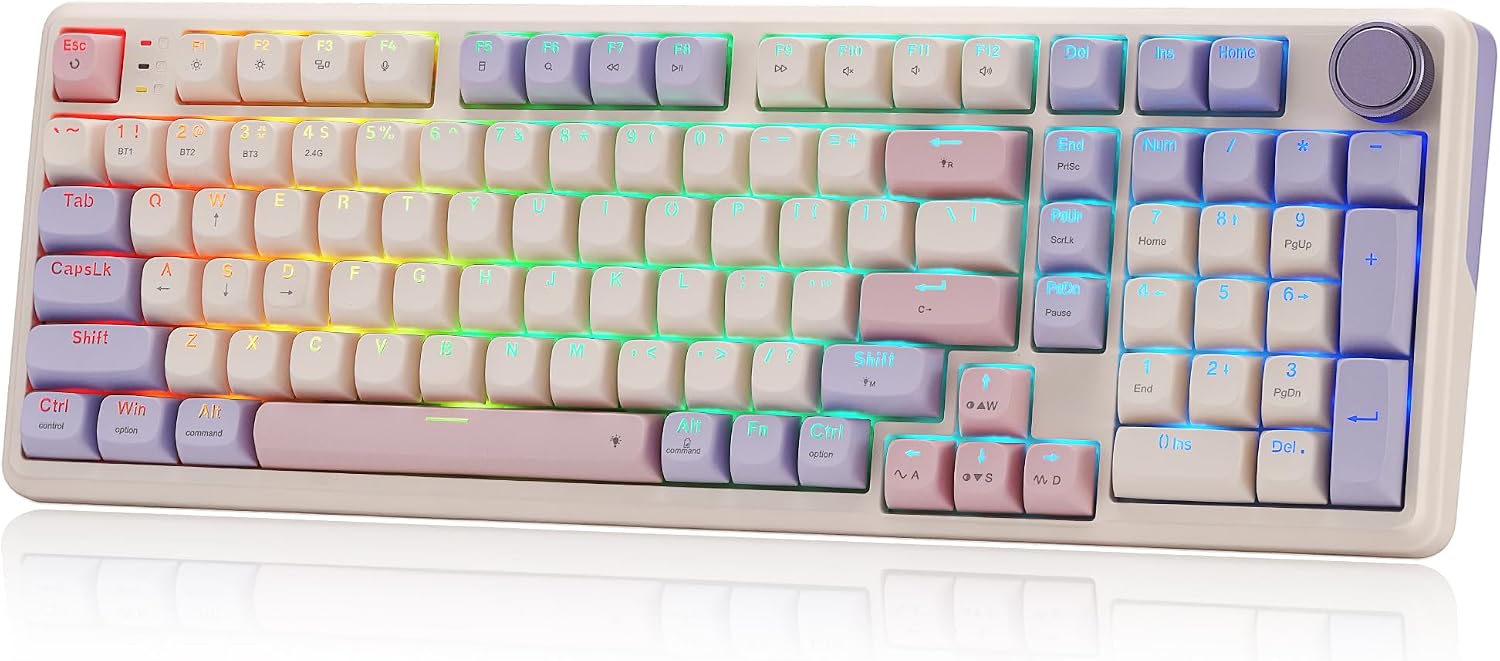 Visit on Amazon → Redragon K768 PRO |
Wireless | 100 keys with knob | Numpad users who want gasket feel | $64.99 |
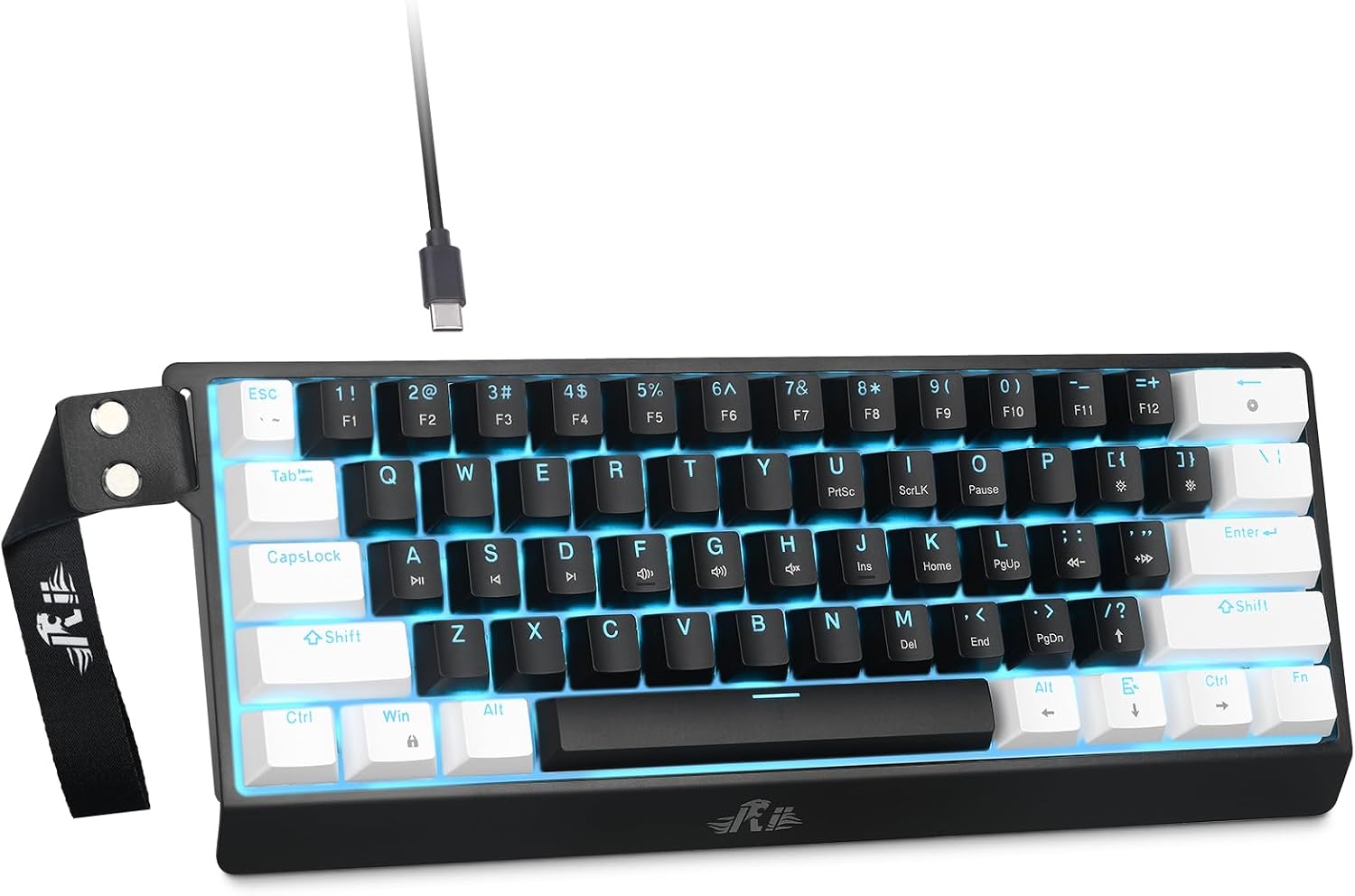 Visit on Amazon → Rii 60% |
Wired | 60 percent | Wired-only desks on a budget | $29.99 |
 Visit on Amazon → 20 Pack Acoustic Panels |
Not a keyboard | 11.8 by 11.8 by 0.36 inches each | Taming a reflective room | $49.99 |
Should you buy the Keychron K2 75%?
Yes, for most people. It is the board I recommend when someone wants one keyboard that works with a Mac and a Windows machine, keeps the arrow keys and function row, and does not need a dongle hanging off the side of a laptop. The layout is the argument. Bluetooth is the convenience. If you want the smallest number of decisions between you and typing, this is the pick.
Should you buy the Redragon K768 PRO?
If you need a number pad, yes. The 100-key layout keeps the numpad without the width of a full-size board, and the gasket mount is the reason to choose it over a cheaper tray-mounted keyboard. The knob and the large battery are the details that keep it on a desk. If you never touch a numpad, you are paying for keys you will not use.
Should you buy the Rii 60%?
Yes if you want wired simplicity and you are ready to live on layers. No if you reach for arrow keys by reflex. This is the board I would hand to someone setting up a second desk or a first mechanical keyboard on a tight budget, because there is nothing to configure and nothing to charge.
Should you buy the acoustic panels?
Yes if your office echoes. Panels are the cheapest change on this list that alters what a room sounds like, and a room with hard walls makes every keyboard louder than it needs to be. Just go in with the right expectation: they absorb reflections, they do not soundproof a wall. Buy them for how your desk sounds to you and to the people on your calls, not for the neighbor.