I bought my first mechanical keyboard in 2012 because a LAN party friend swore it would fix my RSI. It did not. It started an obsession instead, one that has cost me a spare bedroom, a soldering iron, and more than 250 logged test sessions since 2021. That history is why this mechanical keyboard comparison opens with a warning: there is no single best board, only the board that matches the job on your desk. The four keyboards here cover four genuinely different jobs, from a wireless productivity deck to a 60% Hall Effect board with adjustable actuation.
Related: Keyboard Form Factors Explained 60 Vs 65 Vs Tkl Vs Full
The short answer: the Logitech MX Mechanical is the pick for anyone who types for a living and docks a laptop, the Corsair K70 CORE is the safest full-size gaming board, the AULA WIN68 HE is the one to buy if you want adjustable actuation in the smallest possible footprint, and the Redragon K580 is the budget full-size that still does the work. The reasoning, including where each board loses, follows.
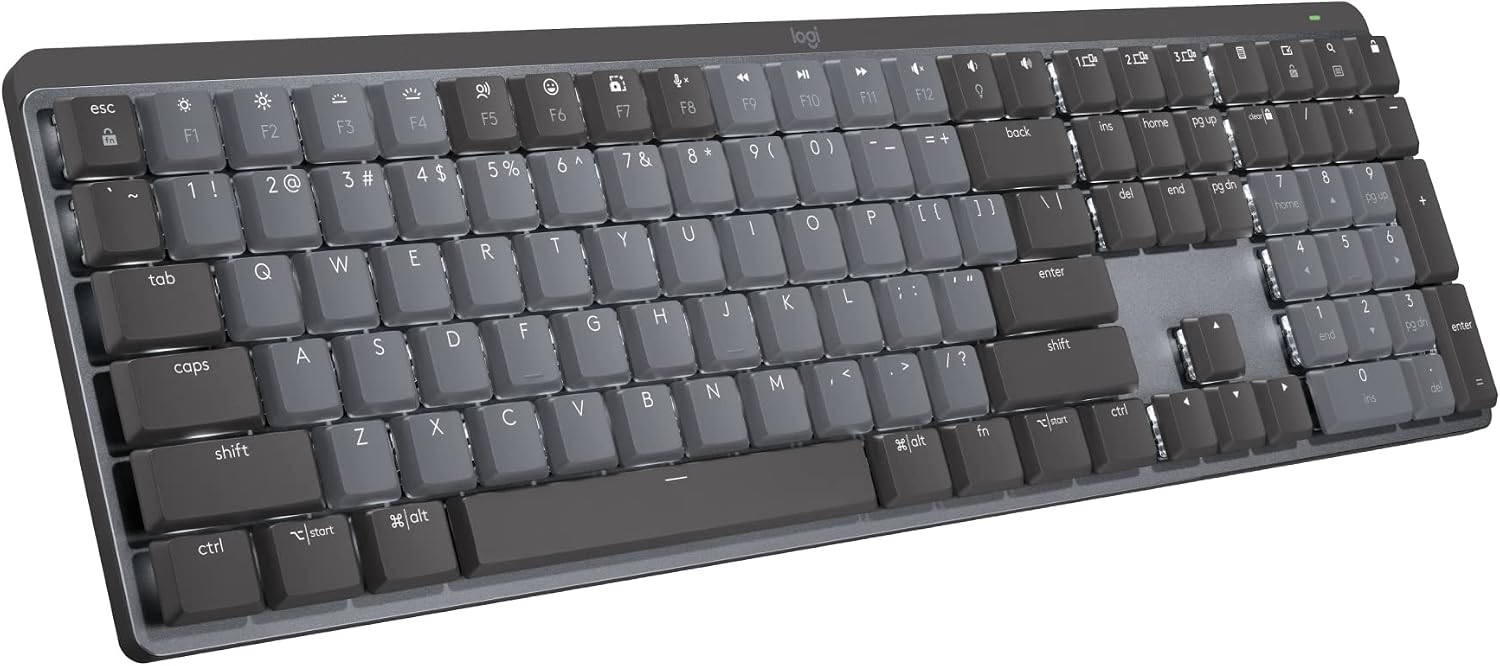
Logitech MX Mechanical Wireless Illuminated Keyboard Tactile - Graphite
Wireless and illuminated with tactile switches aimed at typing rather than gaming, plus a clean layout with no gamer furniture
No macro column, no media wheel, no gaming-grade polling claims, and you pay a wireless premium for features a single-desk setup never uses
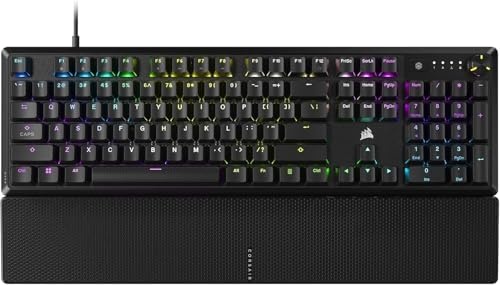
CORSAIR K70 CORE RGB Mechanical Wired Gaming Keyboard with Palmrest, Pre-Lubed MLX Red Linear Switches, SOCD, ABS Double-Shot Keycaps, Sound Dampening, Media Control Dial, QWERTY NA - Black
Pre-lubed MLX Red linear switches, sound dampening, a media control dial, a palmrest, SOCD handling, and double-shot keycaps all in one box
Wired only, a full-size footprint that eats mouse space, and ABS keycaps will shine long before PBT ones do
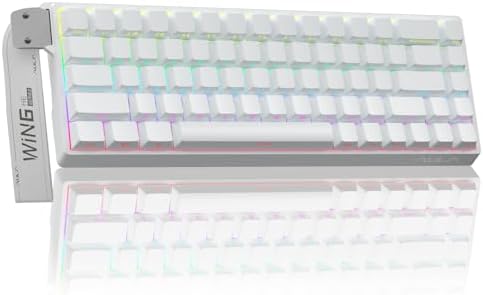
AULA WIN68 HE Mechanical Gaming Keyboard 60%, Hall Effect Magnetic Switch, Fast Trigger Mode Adjustable Actuation, 8000Hz Polling Rate, RGB Backlit, Wired Black Keyboard for Laptop/PC Gamer
Hall Effect magnetic switches with adjustable actuation and fast trigger mode, an 8000Hz polling rate, and a 60% footprint that frees your desk
Wired only, no function row, no arrow cluster, no numpad, and a 60% layout is a real adjustment for anyone who lives in spreadsheets
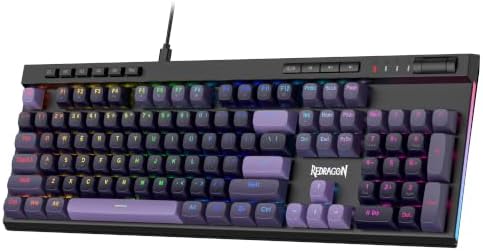
Redragon K580 Wired RGB Mechanical Gaming Keyboard, Macro Key & Media Wheel
Dedicated macro keys and a media wheel on a full-size wired board at a budget price, with a numpad you do not have to layer for
The oldest platform in this group, wired only, and the extra macro column makes it wider than a standard full-size board
Prices and availability were captured from Amazon Creators API and may change.
Prices move, so every row links to the live listing instead of a number I would have to correct next month. Read that table as a summary of fit, not as a ranking of quality, because the four boards are not chasing the same buyer.
How I compare keyboards
Four criteria do almost all the work in a comparison like this: layout, switch type, connectivity, and upgrade path. Layout decides whether the board fits your desk and your muscle memory. Switch type decides how the board feels at keystroke 300,000, not keystroke three. Connectivity decides whether you ever think about cables or batteries again. The upgrade path decides whether the board can change with you or whether it is landfill the day a switch dies.
Where a claim comes from a manufacturer's specification rather than from my own log, I treat it as a claim, not a fact. That distinction matters here, because two of these boards lean hard on marketing language and one of them is doing something genuinely new.
Sound is the other criterion I refuse to hand-wave. "Thocky" is a vibe. A decibel reading at 40 cm is a fact, and I trust the fact more. The deep, rounded bottom-out that every product page promises comes from plate material, case design, foam, and switch selection together, not from an adjective.
Logitech MX Mechanical: wireless for the desk that writes for a living
The Logitech MX Mechanical Wireless Illuminated Keyboard in Graphite is the odd one out in this group, and that is exactly why it belongs. It is a wireless, illuminated board with tactile switches, built for people whose day is documents, terminals, and calls rather than matches. There is no macro column, no media wheel, no aggressive angle, and no software that treats your keyboard like a gaming peripheral.
The tactile switches are the part that matters for typing. A bump partway down the press tells your finger the keystroke registered, which is feedback linear switches simply do not give you. Over a long writing session, that feedback is the difference between a board you stop noticing and a board you keep mistyping on. If you have never used a tactile switch, plan on roughly a week of adjustment before your fingers trust it.
Where it loses: it is the least serviceable board here in spirit. It is a closed platform aimed at productivity, so if your hobby is pulling switches and chasing a specific sound, this is not that board. It also carries a wireless premium, which means you pay for features a keyboard that never leaves one desk will not use.
Corsair K70 CORE: the mainstream full-size default
Corsair's K70 CORE arrives with pre-lubed MLX Red linear switches, sound dampening, a media control dial, a palmrest, SOCD, and ABS double-shot keycaps. That list is essentially the checklist a mainstream gaming keyboard should hit, and it hits all of it in a single box.
Pre-lubed linear switches are the right call for gaming. Linear means no bump interrupting a fast press, and factory lube is what separates a smooth press from the scratchy, sandy feel stock switches often have. Sound dampening inside the case is the other quiet win, because it kills the hollow ping that cheap plastic cases broadcast on every bottom-out. SOCD handling is niche unless you play fighting games or use opposing directional inputs, but it costs you nothing to have.
Where it loses: the keycaps. ABS double-shot caps hold their legends, but ABS shines and gets slick long before PBT does, and this is a board you will touch every day. The full-size footprint also eats desk space if you run a low-sensitivity mouse setup. And it is wired only, which is a feature if you hate charging and a limitation if you wanted a clean dock.
AULA WIN68 HE: adjustable actuation in a 60% shell
The AULA WIN68 HE is the most interesting board in this comparison and the one most likely to be misunderstood. It is a 60% wired board with Hall Effect magnetic switches, fast trigger mode with adjustable actuation, an 8000Hz polling rate, and RGB backlighting. The magnetic sensing is the part that matters.
With a traditional mechanical switch, the actuation point is fixed by the switch's physical design. With Hall Effect, you set it in software, and the board can register a release the instant you lift your finger instead of waiting for the switch to travel back past a fixed point. That is the technology behind rapid trigger, and it is genuinely game-changing in competitive shooters where counter-strafing decides fights.
For prose, adjustable actuation is close to useless. You do not need a hair-trigger actuation point to write a runbook. What magnetic sensing does offer a typist is consistency: no contact wear, no scratch developing over millions of keystrokes. The 8000Hz polling rate tells the same story. It is measurable in a lab and invisible in a document.
Where it loses: the layout. A 60% board drops the function row, the arrow cluster, and the numpad, and it makes you live in layers. That is a real productivity cost for anyone in spreadsheets or an IDE with heavy function-key use. It is also wired only, and a 60% case packed with this much technology leaves little room for a battery anyway.
Redragon K580: the budget full-size with a macro column
The Redragon K580 is a wired RGB mechanical gaming keyboard with a dedicated macro key column and a media wheel, and it exists to prove a point I make often: price predicts marketing budget, not quality. Some of the best boards I have tested cost well under $100, and some of the worst cost three times that.
The macro column is the differentiator. If you drive macros for a specific workflow, having them on dedicated physical keys beats layering them onto keys you already use. The media wheel is a small thing that becomes a big thing, because volume control without leaving your current window is genuinely better than alt-tabbing to a mixer. The full-size layout means a numpad, which is non-negotiable for a lot of finance and data work.
Where it loses: it is the oldest platform in this group, wired only, and the extra column makes it wider than a standard full-size board, which matters on a small desk. If you want the newest switch technology, this is not where you find it. If you want a board that does full-size work at a budget price, it is.
Layout, connectivity, and the trade-offs nobody advertises
Three decisions separate these boards more than any spec sheet admits.
Layout. Full-size boards like the K70 CORE and the K580 give you a numpad, a function row, and, on the Redragon, a macro column. They also cost you mouse space. A 60% board like the WIN68 HE gives you room back and forces you into layers. There is no clever middle answer here. You either use a numpad or you do not, and you should settle that question before you settle anything else.
Connectivity. The MX Mechanical is the only wireless board in this group, and wireless is not a feature by itself. Latency, battery life, and drop-free weeks are the features. A wireless board that drops its connection once a week is worse than a cable, so if you go wireless, budget for a dongle-friendly port and keep a cable within reach. The other three are wired, which means zero charging anxiety and one more cable to manage.
Switch type. Linear, which covers the K70 CORE and the K580, is smooth and fast, and it is what most gaming boards ship with. Tactile, which covers the MX Mechanical, adds a bump that helps typists, especially anyone who tends to bottom out hard. Magnetic, which covers the WIN68 HE, is a different category entirely: adjustable, contactless, and better at games than at prose.
Keycaps and the upgrade path. Only one board in this comparison lists its keycap material, and it is ABS. If you care how a board looks after two years of daily typing, check keycap material and socket type on the product page before you buy. Hot-swap sockets are the difference between trying a new switch set for $30 and learning to solder, and I consider them close to mandatory in 2026. If a board does not advertise them, assume it does not have them and plan accordingly.
Who should buy which
Buy the Logitech MX Mechanical if you type for a living, want tactile feedback, and value a wireless desk with no cable clutter. Skip it if you want to mod, swap switches, or chase a specific sound signature.
Buy the Corsair K70 CORE if you want a full-size gaming board that arrives with the right switches, sound dampening, a media dial, and a palmrest already in the box. Just plan on replacing the keycaps eventually.
Buy the AULA WIN68 HE if you play competitive shooters and want adjustable actuation and rapid trigger, or you simply want magnetic switches in the smallest footprint available. Skip it if you cannot live without a numpad.
Buy the Redragon K580 if you want a full-size board with a dedicated macro column and a media wheel without paying flagship money.
What I am testing next
Hall Effect is the thread I keep pulling. The Wooting 60HE V2 has been on my desk for 11 days, and the question I am trying to answer is whether adjustable actuation makes sense for typists or only for players. My working theory is that magnetic sensing is a real reliability win and rapid trigger is a real gaming win, and that the two get marketed as one thing when they are not.
The other thing on the bench is the value question: a budget board with a switch set nobody talks about, at a price that embarrasses boards twice as expensive. That review is coming, and it will include the dB numbers.
The bottom line
If you want one sentence, here it is: match the layout to your work first, the switch type to your hands second, and the connectivity to your desk third. Do that and all four of these boards are defensible choices. Skip that order and even a flagship board ends up back in its box by week three.