If you write code for a living, the keyboard is the tool your hands touch more than any other, and the difference between a board that disappears under your fingers and one you fight at 2 a.m. during a deploy has almost nothing to do with how it looks in a product photo. This guide covers six products from the same buying batch: four mechanical keyboards, one 24-piece pack of replacement switches, and one item that is not a keyboard at all and is labeled as such below. The scope is deliberately narrow. Each board is judged on what you can verify before purchase: layout and footprint, switch type, connectivity, illumination and onboard controls, and the maintenance the design will ask of you over a year of daily use. If you are shopping for mechanical keyboards for coding, the shortlist runs from a compact wireless board up to a tenkeyless Hall Effect model.
Related: Mechanical Keyboard Switch Types Explained
Quick answer
The Razer Huntsman V3 HE Magnetic TKL 8KHz Wired Gaming Keyboard is the strongest fit for coding at a desk because it keeps the tenkeyless layout that editors, terminals, and browsers assume, while using magnetic switches, the switch type associated with adjustable actuation and rapid trigger. Choose the Logitech MX Mechanical Wireless Illuminated Performance Keyboard Clicky instead when you want wireless connectivity and backlighting and would rather not think about a cable.
Mechanical keyboards worth comparing
Each card below points to the exact product it describes. The switch pack and the non-keyboard item are labeled so you can skip them in a hurry.
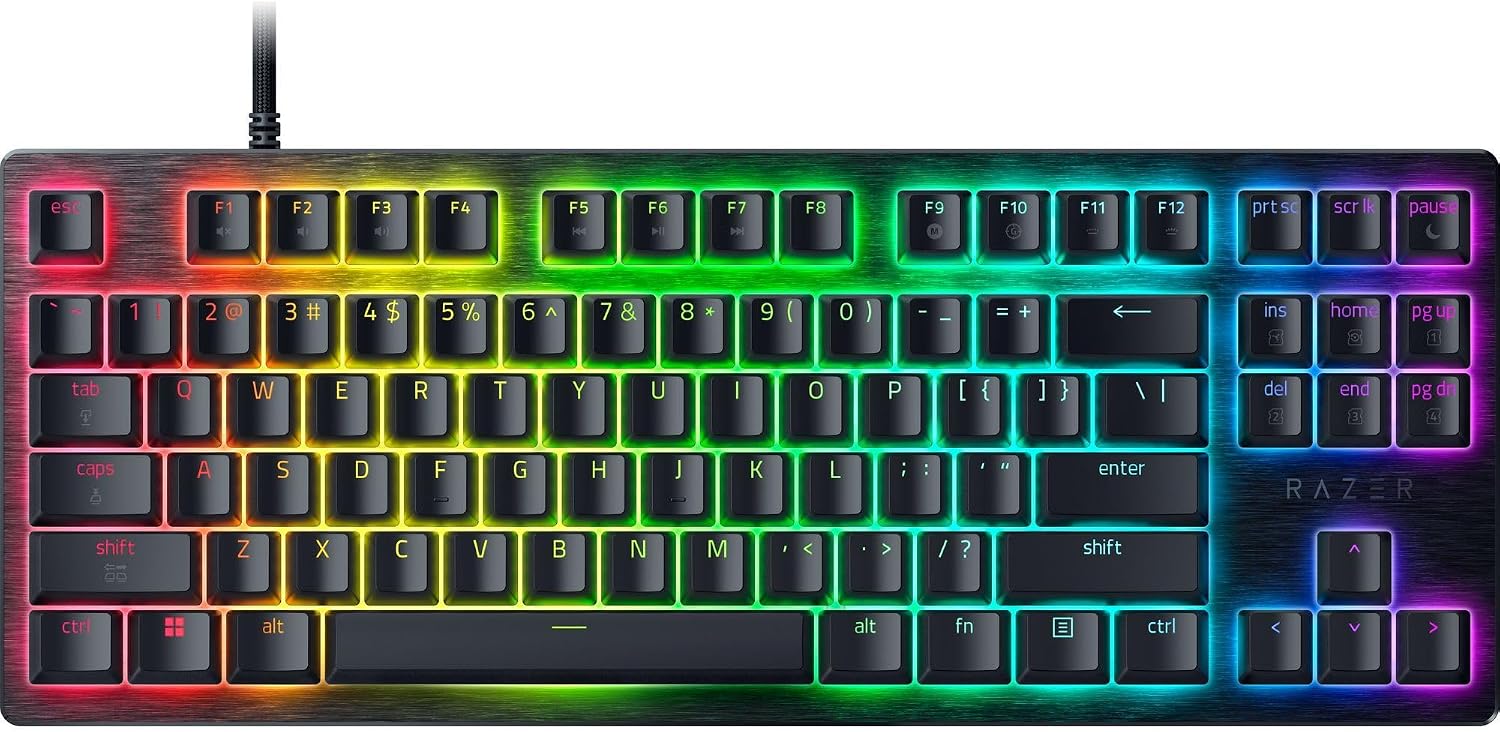
Razer Huntsman V3 HE Magnetic TKL 8KHz Wired Gaming Keyboard
The tenkeyless version of Razer's magnetic Hall Effect platform, wired, with an 8,000 Hz polling rate. Tenkeyless keeps the function row and arrow cluster while dropping the number pad, which is the layout most code editors and terminals assume.
Visit on Amazon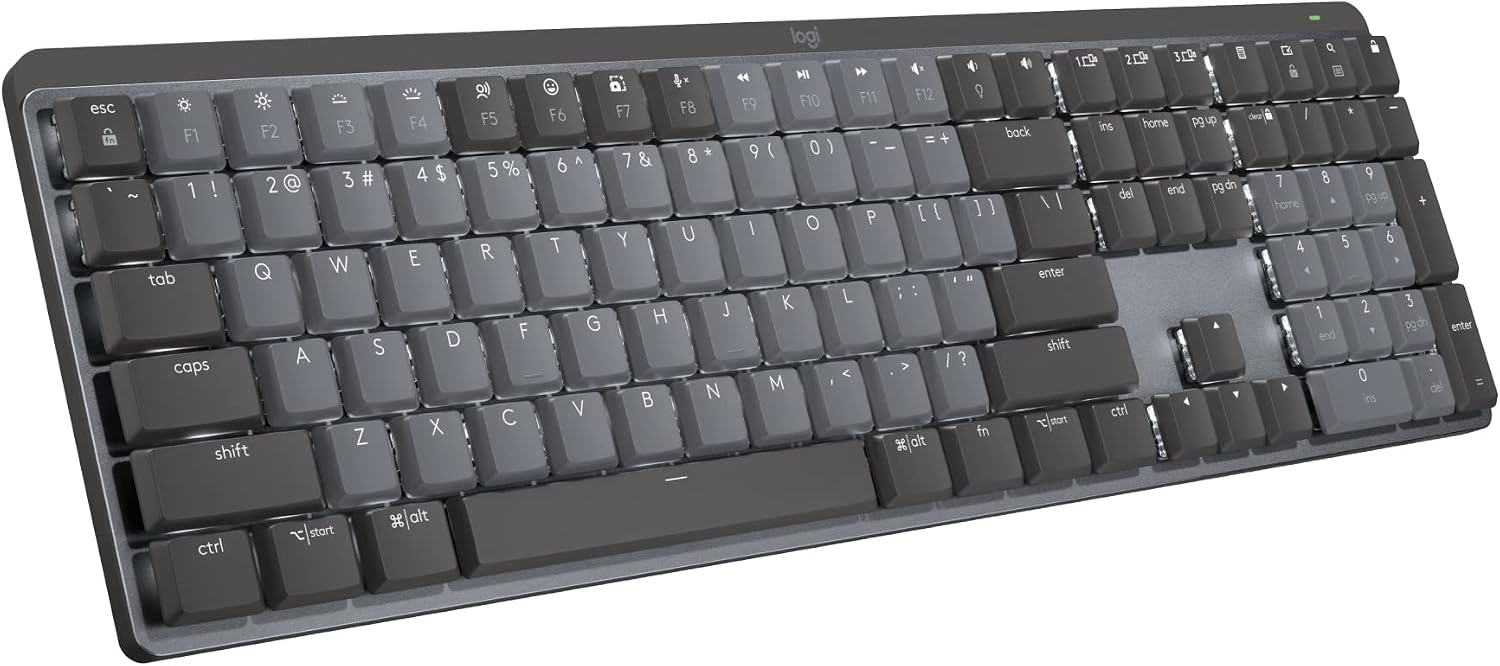
Logitech MX Mechanical Wireless Illuminated Performance Keyboard Clicky
Logitech's MX Mechanical is the wireless, illuminated option in this set, and this listing is the clicky switch variant. It is the board to look at when you move between a laptop and a desktop and want backlighting without a cable.
Visit on Amazon
Razer Huntsman V3 HE Magnetic Mini 65% 8KHz Wired Gaming Keyboard
The 65% cut of the same magnetic, 8,000 Hz wired platform. A 65% layout keeps the arrow cluster but moves the function row onto a layer, so compactness costs you a handful of key combinations.
Visit on Amazon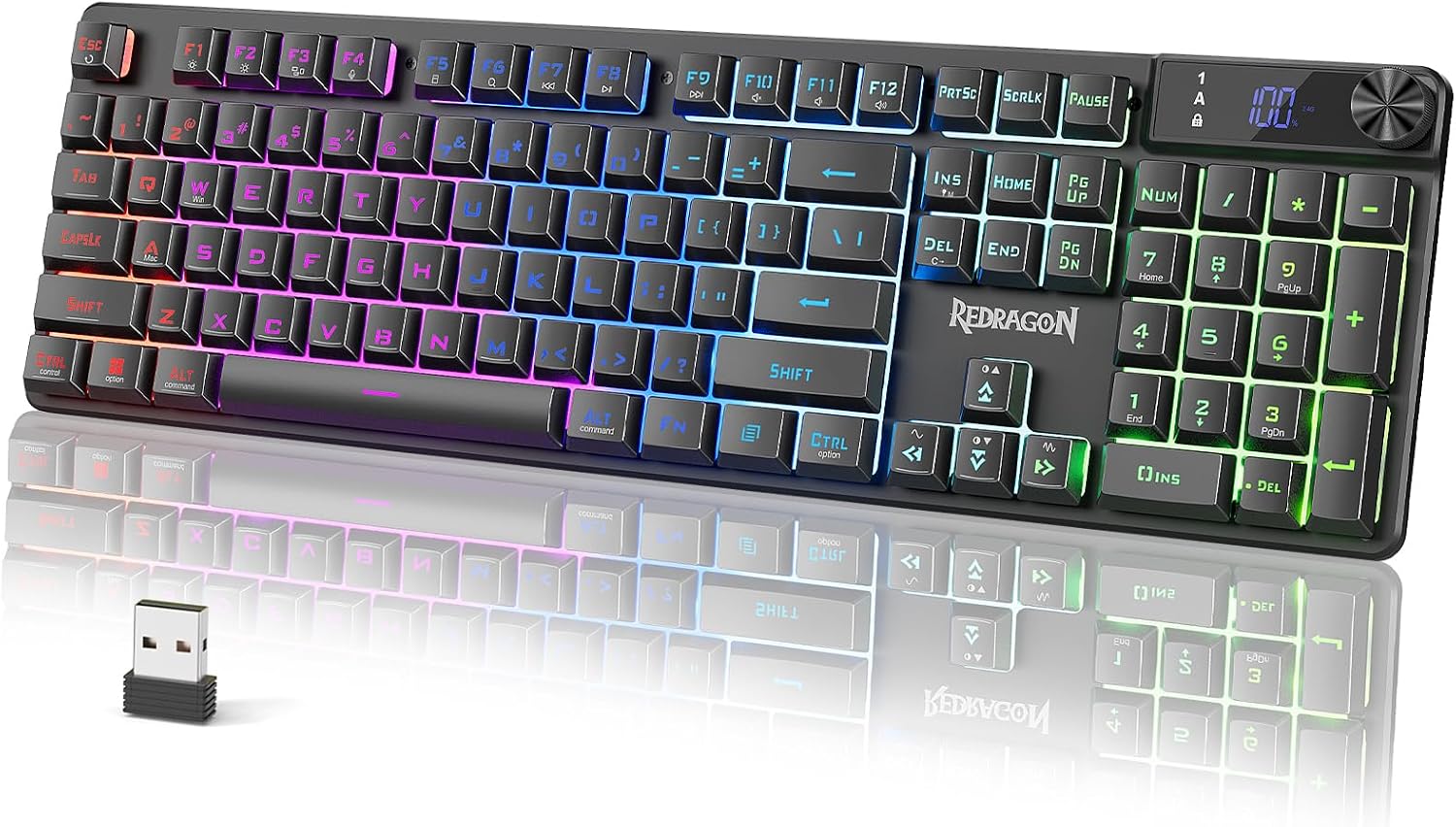
Redragon K521 Pro Wireless Gaming Keyboard with Screen
A wireless keyboard with an onboard screen, and the lowest-cost board in this roundup. Worth a look when cable-free placement and the screen matter more than adjustable switch behavior.
Visit on Amazon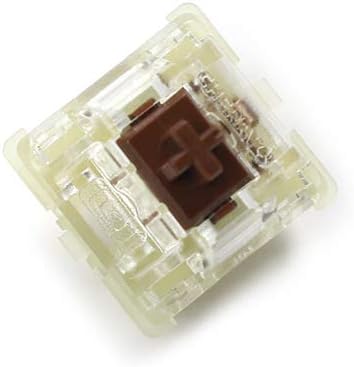
Wholesales Authentic SMD RGB Cherry mx Switch 3 pin Mechanical Keyboard Speed Silver Silent red Blue Pink Switches (Brown 3 pin, 24 pcs)
A 24-piece pack of 3-pin Cherry MX Brown switches with SMD RGB compatibility. Brown is a tactile, non-clicky switch, and 3-pin switches drop into both 3-pin and 5-pin hot-swap sockets.
Visit on Amazon
PetAg KMR Kitten Milk Replacer Liquid - 16 oz, Pack of 3 - Ready-to-Feed Formula with Vitamins for Newborn Kittens to 1 Year - Easy to Digest
Ready-to-feed kitten milk replacer with vitamins, sold as three 16 oz bottles for newborn kittens up to one year. This is not a keyboard. It is listed for completeness and can be skipped.
Visit on AmazonPrices and availability may change. Check the retailer for current details.
How these products were compared
This guide compares five things: layout and footprint, switch type and how it is adjusted, connectivity, illumination and onboard controls, and the maintenance the design asks for over a year of use. The comparison is built from the product names and categories in each listing plus general facts about how those layouts, switch families, and connection methods behave in practice. It is not a hands-on test of any individual unit, and no performance number here comes from a bench measurement. Product names, images, and retailer links are matched to the same product record so that every card points to the product shown. Where a listing is a pack of switches or a non-keyboard item, the card says so outright rather than dressing it up as a keyboard.
How to choose the right keyboard
Start with layout, because it is the one thing you cannot change after purchase. A 65% board keeps the arrow cluster and drops the function row onto a layer, which is fine if you have already memorized your layer shortcuts and irritating if you live in an IDE that leans on F1 through F12. Tenkeyless keeps the function row and arrows but removes the number pad, which buys you mouse room and costs you fast numeric entry. Full-size layouts keep everything, including the footprint you may not have. Before anything else, measure the space you actually have: a keyboard tray, a laptop riser, or a desk where a monitor stand already claims the middle. Write the number down and compare it to the listed dimensions rather than trusting your memory of the old board.
Switch type is the second decision, and it splits three ways. Linear switches travel smoothly with no bump, tactile switches add a bump without a click, and clicky switches add both. The 24-piece pack in this guide is Brown, which is the tactile, non-clicky option, and it is a reasonable way to change the feel of a board that already has hot-swap sockets. If you are unsure which family suits your hands, our switch types explainer walks through the differences without the marketing language. Magnetic Hall Effect switches are a separate category: instead of a simple on or off, they report how far the key has traveled, which is why that platform supports adjustable actuation points and rapid trigger. For prose and code, the adjustable actuation is the interesting part; rapid trigger mostly matters in games. Finally, decide between wired and wireless honestly. Wireless removes cable management and adds charging to your routine. Wired removes the battery question entirely and is what makes a high polling rate possible in the first place.
Razer Huntsman V3 HE Magnetic TKL 8KHz Wired Gaming Keyboard
This is a tenkeyless wired board built on Razer's magnetic Hall Effect platform, and the listing specifies an 8,000 Hz polling rate. Tenkeyless is the layout argument in its favor for coding: you keep the function row and the arrow cluster that editors, terminals, and window managers assume, while the number pad goes away and frees a few inches of desk for the mouse. The magnetic switch type is the other argument, because Hall Effect switches measure key travel rather than simply closing a contact, which is what allows the actuation point to be tuned and rapid trigger to exist as a feature at all.
The trade-offs are real and worth stating plainly. It is a wired board, so the cable is part of your desk whether you like it or not, and there is no battery-free placement across the room. There is no number pad, which matters if you type figures all day. The 8,000 Hz polling rate is a gaming-oriented number; for writing code and prose it is not a benefit you will feel, and it depends on the rest of your USB chain to mean anything. If your priority is cable-free placement or backlighting on a laptop-and-desktop rotation, this is the wrong board for you, and the wireless option below is the better answer. If you want the shortcuts you already know plus a switch platform you can retune later, this is the pick.
Alternatives to consider
The Logitech MX Mechanical Wireless Illuminated Performance Keyboard Clicky is better suited to a desk where you move between a laptop and a desktop, because it is the wireless, illuminated option in this set and this listing is the clicky variant. The Razer Huntsman V3 HE Magnetic Mini 65% 8KHz Wired Gaming Keyboard is a stronger fit when desk space is the binding constraint and you accept that the function row moves onto a layer.
The Redragon K521 Pro Wireless Gaming Keyboard with Screen covers the low-cost end of the wireless question, adding an onboard screen to a cable-free board. The Wholesales Authentic SMD RGB Cherry mx Switch 3 pin Mechanical Keyboard Speed Silver Silent red Blue Pink Switches (Brown 3 pin, 24 pcs) covers the upgrade path instead of the purchase: 24 tactile, non-clicky switches for a board that already has hot-swap sockets or an owner with a soldering iron. The last card in the grid, the PetAg KMR Kitten Milk Replacer Liquid - 16 oz, Pack of 3 - Ready-to-Feed Formula with Vitamins for Newborn Kittens to 1 Year - Easy to Digest, is not a keyboard at all and appears only because it belongs to the same product set. Skip it unless you are hand-rearing a kitten.
Day-to-day use and maintenance
Hot-swap sockets are the single feature that changes how long a board stays interesting. If a board has them, a switch swap takes a few minutes and a small puller; if it does not, changing switches means desoldering, which most people will never do. The 3-pin switches in the pack above fit both 3-pin and 5-pin hot-swap sockets, so they are the safer purchase, while 5-pin switches need their two extra plastic legs clipped before they will seat in a 3-pin board. Keep the puller and a keycap puller together, because you will lose one of them.
Routine care is boring and it works. Dust collects between keycaps and shows up as a gritty feel on the switches underneath, so a soft brush or short bursts of compressed air every few weeks does more than any deep clean. Unplug the board before you clean it, do not soak keycaps in anything stronger than warm water with a drop of dish soap, and let everything dry completely before reassembly. Spacebar rattle is the most common complaint on any board and is usually a stabilizer issue rather than a defect; if it bothers you, look up the specific board's stabilizer service procedure rather than prying at it. On the wireless side, the maintenance item is charging discipline: keep a spare cable within reach, expect backlighting to shorten runtime noticeably, and if a 2.4 GHz connection stutters, try a different port or an extension cable before you blame the board. For the kitten milk replacer, follow the label's storage and feeding instructions and check with a veterinarian rather than a keyboard guide.
Buying checklist
- Measure the desk, tray, or riser space you have before comparing layouts.
- Choose 65%, tenkeyless, or full-size based on the shortcuts you use daily, not an occasional edge case.
- Confirm the exact model includes the feature you need: wireless, backlighting, hot-swap sockets, or adjustable actuation.
- Check whether the lighting or remapping software requires an account, and read the cleaning instructions.
- Verify the current retailer price, availability, and return terms before ordering.
Final recommendation
Choose the Razer Huntsman V3 HE Magnetic TKL 8KHz Wired Gaming Keyboard when you want the function row and arrow cluster without a number pad, and you are happy to stay wired in exchange for a magnetic switch platform you can retune. Choose the Logitech MX Mechanical Wireless Illuminated Performance Keyboard Clicky when cable-free placement and backlighting matter more than adjustable actuation. The 65% Mini solves a desk-space problem, the Redragon covers the budget wireless slot, and the switch pack is a modification rather than a purchase. The kitten milk replacer is not a keyboard and earns no place on this list on its own merits. Where the available product data does not support a meaningful distinction between two boards, this guide does not invent one.