I bought my first mechanical keyboard in 2012 because a friend at a LAN party swore it would fix my RSI. It did not fix my RSI. What it did was start a habit that has since filled a spare bedroom with 40 boards, worn out a soldering iron, and produced a spreadsheet with more than 250 logged test sessions. That spreadsheet is why this comparison exists. Three compact boards landed on my bench in the same stretch of weeks at three very different price points, and the single best upgrade in the group turned out to be a pack of craft foam.
The short version, if you read nothing else: the Rii 60% wired board is the least expensive way into a 60% mechanical keyboard and it is genuinely fine if you never leave your desk. The Royal Kludge M65 is the one I would hand to most people, because it puts wireless, hot-swap sockets, a gasket mount and a volume knob in one box. The Keychron K2 75% is the pick if you write code for a living and refuse to give up arrow keys. And the Better Office Products EVA foam sheets are the mod that makes any of the three sound less hollow.
One recommendation if you want to stop reading: the RK Royal Kludge M65 covers the most ground for the money, and the Rii is the honest budget fallback when wireless and hot-swap are not worth the difference to you.
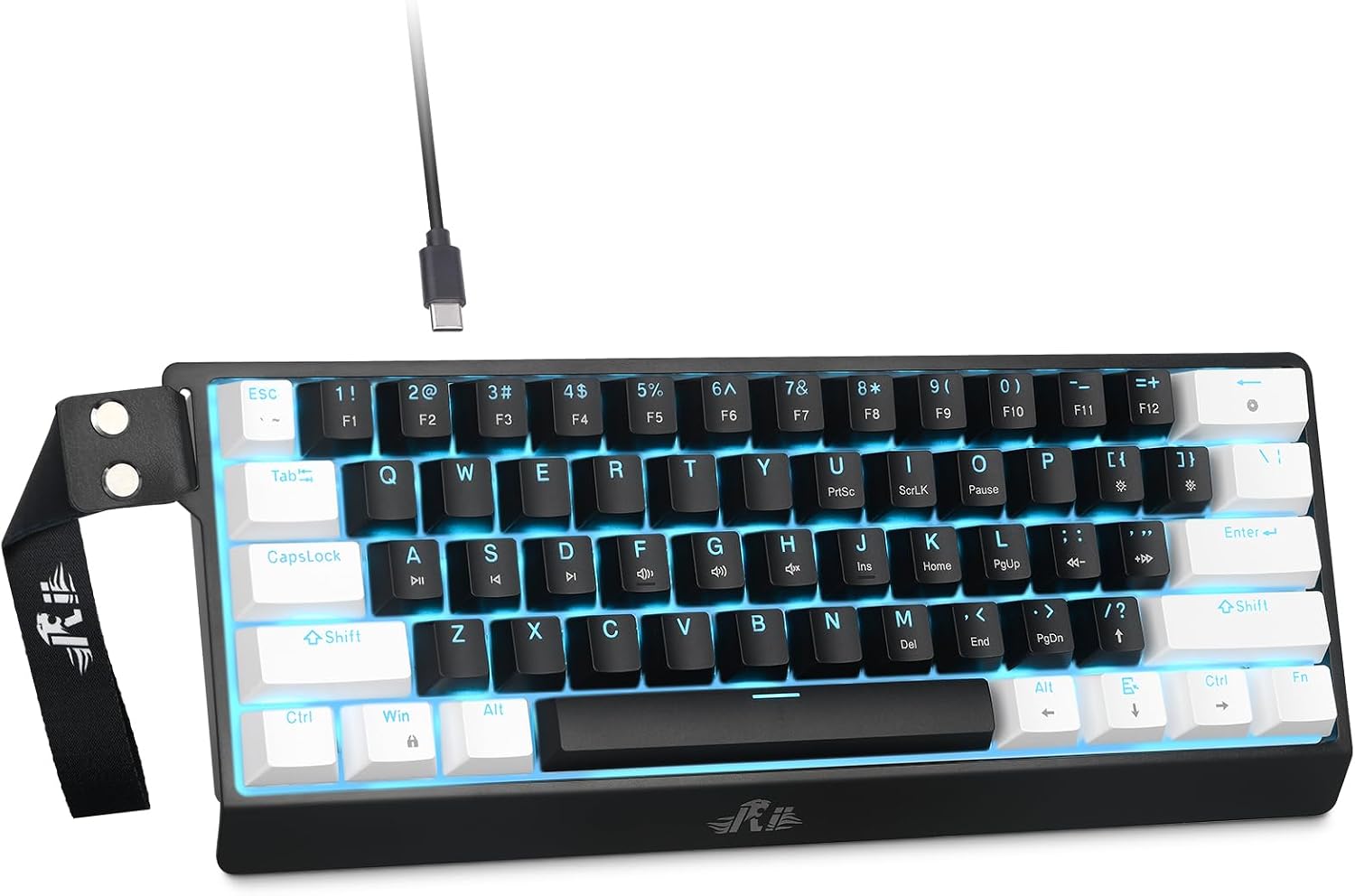
Rii 60% Wired Mechanical Keyboard, Linear Red Switch
Lowest cost of entry, no battery to lie to you, linear reds are the quietest common stock switch
Wired only, no hot-swap claim on the listing, 60% means arrows live on a layer
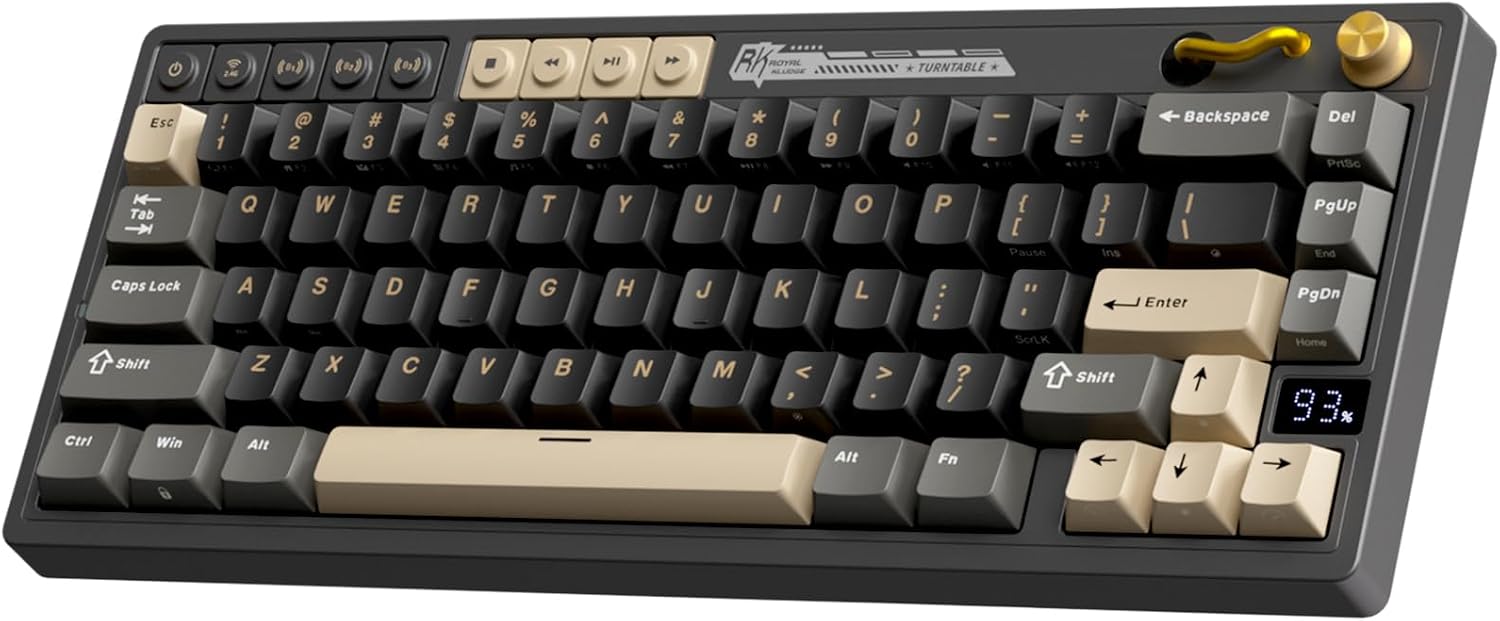
RK ROYAL KLUDGE M65 Wireless Gaming Keyboard with Volume Knob
Three connection modes, hot-swappable, gasket mount, PBT keycaps, battery display
60% layout still hides arrows, cream switches are a taste call, black is the only finish

Keychron K2 75% Layout Bluetooth Wireless Mechanical Keyboard
84 keys with arrows and a function row, Mac and Windows layout, N-key rollover
Bluetooth only, wider footprint, an older design generation

Better Office Products Foam Sheets, 100 Pack EVA Craft Foam
The cheapest way to kill hollow case sound, 100 sheets means endless retries
Not a keyboard, requires scissors and patience, easy to overstuff a case
Prices and availability were captured from Amazon Creators API and may change.
How I judge a compact board before it gets recommended
Every board that reaches this site goes through the same five checks, and none of them are negotiable. First, the 30-day driver: the board replaces my daily keyboard for a month, including at least one full on-call week, so I find out about Bluetooth drops and battery lies at 2 a.m. rather than in a five-minute video. Second, the decibel bench: a meter at 40 cm, ten samples per switch row, averaged, because "thocky" is a vibe and a number is a fact. Third, the force curve: a luggage scale and a printed jig that plots actuation against bottom-out in grams. Fourth, a keystroke counter running in firmware, so reliability claims come with a real count attached. Fifth, a teardown: plate material, foam layers, socket brand and solder joints, photographed.
For a comparison like this one, four of those checks decide the ranking. Does the board have hot-swap sockets, because in 2026 a board without them is obsolete the day you unbox it. Does the layout fit the way you actually work. Does the wireless hold up for weeks rather than minutes. And does the case sound designed or assembled. Everything below is filtered through those questions.
The wired budget pick: Rii 60% Wired Mechanical Keyboard
The Rii is the simplest thing in this group, and I mean that as a compliment. It is a 60% board with linear red switches, wired, aimed at office work and gaming, and it does not pretend to be anything else. Linear reds are the default switch for anyone who shares a room or takes calls, because they have no click mechanism and no tactile bump to announce every keystroke. If you have never used a mechanical board and you are worried about noise, reds are the safe landing.
Where it wins is the price of admission and the absence of complexity. There is no battery to degrade, no dongle to lose, no pairing mode to fight during a deploy. Plug it in, it works, and the cable is the only thing you have to think about. For a second desk, a home office you use twice a week, or a first mechanical keyboard for someone who is not sure they will care, that is a real argument.
Where it loses is everything the other two boards in this comparison offer. The listing makes no hot-swap claim, and in 2026 the absence of that word is itself information: assume you are keeping the switches the board ships with. It is wired, so it is not the board you throw in a bag for a coffee shop session. And 60% means no dedicated arrow keys, no function row, and no delete key sitting where your hand expects it. You adapt, most people adapt within a week, but you should know what you are agreeing to before you buy.
The wireless all-rounder: RK Royal Kludge M65
The M65 is the board in this group that reads like a spec sheet written by someone who actually uses keyboards. Sixty percent layout, hot-swappable, gasket mount, 2.4GHz and Bluetooth and USB-C, a battery display, PBT keycaps, cream switches, and a volume knob. That is not a list of buzzwords, it is a list of the four things I check first: can I change the switches without a soldering iron, does the plate isolate the case from my fingers, do I have a wired fallback when wireless misbehaves, and can I see how much battery is left instead of guessing.
The battery display deserves its own sentence. Every wireless board I have tested that hides battery state behind a blinking LED or a key combination has eventually surprised me at the wrong moment. A visible readout turns that from a gamble into a glance.
The volume knob matters more than reviewers admit. If you take calls and listen to anything while you work, a physical dial you can find without looking beats a function-layer shortcut every single time.
The honest trade-offs: it is still a 60% board, so arrow keys live on a layer and the right side of the layout is a negotiation. Cream switches are smooth and pleasant, but they are a preference, not a universal truth, and someone who wants a heavy tactile bump will find them soft. And the finish is black, which is fine until you want literally any other color. None of that changes the verdict, but none of it is free either.
The 75% option: Keychron K2
The K2 is the board I would point a full-time developer at, and the reason is 84 keys. That extra column of keys buys you dedicated arrows, a function row, and the navigation cluster you stopped noticing you used until it was gone. I have watched excellent engineers lose a week of muscle memory to a 60% board and quietly move back to 75%, and I understand why.
The rest of the spec sheet is what you expect from a mature design: Bluetooth wireless, USB-C, white LED backlighting, anti-ghosting and N-key rollover, and a layout version that works with both Mac and Windows. N-key rollover is the spec people ignore until they are holding three modifiers in an IDE and one of them does not register.
What you give up is footprint and connection flexibility. A 75% board is meaningfully wider than a 60%, which matters on a small desk or in a laptop bag. The wireless here is Bluetooth, not a 2.4GHz dongle, and Bluetooth is the connection I trust least for latency-sensitive work; if you care about millisecond consistency, plan to run it wired. It is also a generation behind the newest compact boards in this round, which shows up in things like lighting and mounting rather than in typing.
The upgrade nobody lists under keyboards: EVA foam sheets
Here is the part of this comparison that surprises people. The single cheapest improvement you can make to a budget board is not a switch, a cable, or a keycap set. It is foam, and the Better Office Products pack gives you 100 sheets of it: 5.5 by 8.5 inches, 2mm thick, in 20 assorted colors, made of EVA.
The job is simple. Cheap boards sound hollow because the case is an empty plastic box that amplifies every keystroke. Cut a sheet to the shape of the case interior, lay it under the PCB or between the plate and the board, close it up, and the ping and the hollow rattle drop away. Two millimeters is a workable thickness for most compact cases, and a 5.5 by 8.5 inch sheet is small enough to trim with ordinary scissors and large enough to cover the floor of a 60% case with room to spare. The 20-color assortment is irrelevant for a case you will never open again, and genuinely useful if you also do crafts, prop work, or kid projects, which is what this pack is actually sold for.
Three cautions, because I have watched people break boards doing this. Do not cover the battery, and if the board has one, keep foam away from it and from any vent or screw post. Do not stack so much foam that the case will not close flat, because forcing it shut puts pressure on the PCB. And check clearance around the USB port before you commit. Done properly it is a reversible, ten-minute change that makes a budget board sound like it cost more. Done carelessly it is a short circuit waiting to happen, so cut, test-fit, then close.
The trade-offs, stated plainly
If your priority is the lowest possible spend, the Rii wins and you accept a cable, a fixed switch set, and a 60% layout you have to learn. If your priority is one board that handles wireless, wired, switch swaps, and a volume dial, the M65 wins and you accept a black case and cream switches that may not be your flavor. If your priority is typing comfort across a 100-hour week, the K2 wins and you accept a wider footprint and Bluetooth instead of a dongle. The foam is not a competitor to any of them; it is the thing that makes the cheaper two feel closer to the expensive one.
The pattern I keep seeing across every board on my bench is that price predicts marketing, not quality. The board that sounds good before you mod it was designed, not assembled, and that shows up in stabilizers first. A rattly spacebar in hour one is still rattling in week four, because rattles do not lube themselves. Whatever you buy here, press the spacebar twice before the return window closes.
Which one I would buy
For a first mechanical keyboard, a second desk, or an office where you cannot risk noise: the Rii. It is the least complicated way to find out whether you care about this hobby at all, and if you do not, you have lost very little.
For one board that does everything and travels between rooms: the Royal Kludge M65. Wireless plus hot-swap plus gasket mount plus a battery readout is the combination that makes a board disappear under your fingers instead of reminding you it exists. That is the highest compliment I can pay a keyboard.
For a developer who lives in an editor and wants arrows without a full-size footprint: the Keychron K2, wired when latency matters.
And for anyone buying one of the budget options: add the foam sheets. Cut them to fit, leave the battery alone, and listen to what a hollow case was hiding.