If you type for a living, shopping for mechanical keyboards for coding turns into a layout question fast: 60% or full size, wired or Bluetooth, clicky or quiet. Then the search results bury you in switch names, group buys that ship next year, and reviews that describe a board's sound with adjectives instead of numbers.
This guide keeps the scope narrow. Four keyboards are compared here, all buyable at retail today, plus one inexpensive switch sampler that answers the switch question before you commit to a board. The criteria are things you can verify on a product listing: footprint and layout, wired versus wireless connectivity, switch type where the listing names it, keycap material, programmability, and backlighting.
What this guide will not do is pretend a spec sheet is a 30-day trial. Every distinction below comes from the product listings themselves, and the recommendation at the end is about fit, not about which board has the loudest marketing.
Related: 60% vs Full-Size Layouts: Which One Fits Your Desk
Quick answer
The Anne Pro 2 Mechanical Gaming Keyboard 60% True RGB Backlit is the strongest fit for coding on a crowded desk, because the listing pairs a compact 60% layout with Bluetooth 5.0 wireless, a wired Type-C connection, PBT keycaps, and full-key programmability. Choose the Redragon K582 Wired RGB Mechanical Gaming Keyboard instead when you want a standard 104-key layout with a number pad and no battery to manage.
Keyboards worth comparing
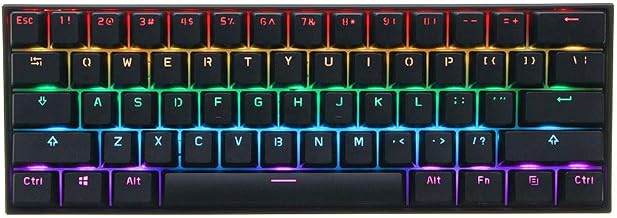
Anne Pro 2 Mechanical Gaming Keyboard 60% True RGB Backlit - Wired/Wireless Bluetooth 5.0 PBT Type-c Up to 8 Hours Extended Battery Life, Full Keys Programmable (Kailh Box White, Black)
Check current Amazon price
A 60% board with true RGB backlighting, Bluetooth 5.0 wireless plus a wired Type-C connection, PBT keycaps, and full-key programmability. This version ships with Kailh Box White switches.
Visit on Amazon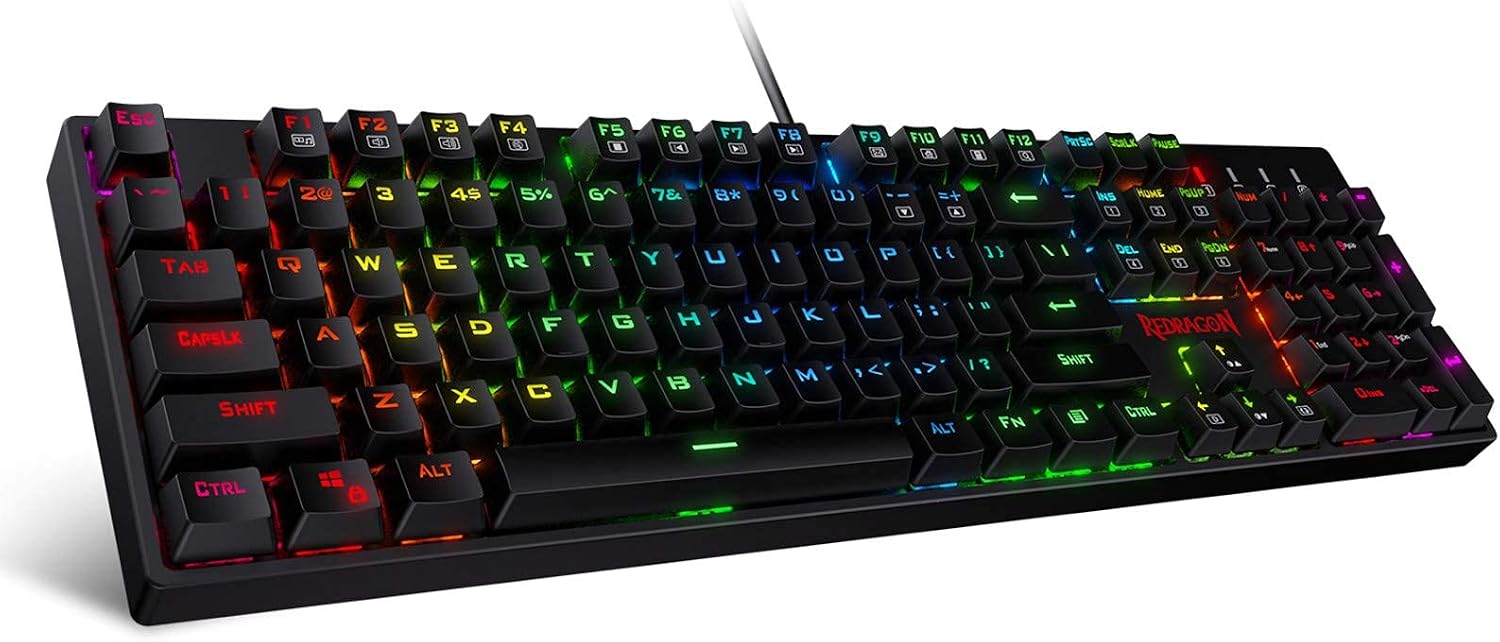
Redragon K582 Wired RGB Mechanical Gaming Keyboard, 104-Key Standard Layout
A wired mechanical board with RGB backlighting and a standard 104-key layout, so the number pad and function row stay exactly where you expect them.
Visit on Amazon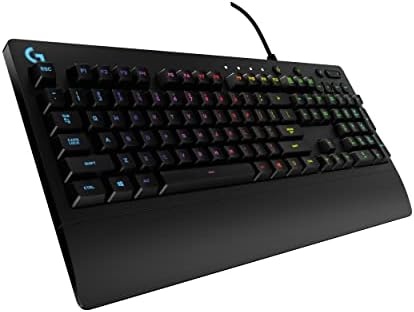
Logitech G213 Prodigy Wired RGB Gaming Keyboard - Black
A wired, full-size RGB keyboard from Logitech's gaming line, aimed at buyers who want a familiar layout and backlighting rather than a compact footprint.
Visit on Amazon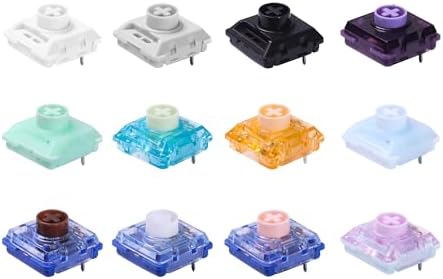
Low Profile Mechanical Keyboard Switches Tester Kit, 12 Switch Sampler with Linear, Tactile, and Clicky Types
A 12-switch low-profile sampler covering linear, tactile, and clicky types, so you can compare switch character with your own fingers before buying a full board.
Visit on AmazonPrices and availability may change. Check the retailer for current details.
How these products were compared
This guide compares five things: layout and footprint, connectivity, switch type and programmability, keycap material and backlighting, and how easy each product is to buy at retail without a group buy or a waitlist. Product names, images, and retailer links are matched to the same listing so that every card points to the product shown.
Two limits are worth stating plainly. First, nothing here is a hands-on test. The switch sampler exists so you can feel switch character in your own hands, and the keyboards are compared on what their listings specify. Second, no prices appear in this article, because prices move. Use the link on each card to confirm current price, availability, and return terms before you order.
How to choose the right keyboard
Start with layout, because it is the one decision firmware cannot undo. A 60% board like the Anne Pro 2 drops the number pad, the function row, and the dedicated arrow cluster into a footprint that is roughly the width of the main typing block alone, and you reach everything else through programmed layers. That is a real trade. It frees desk space and shortens the reach from keyboard to mouse, but if your week involves spreadsheets, numeric entry, or CAD, a full-size board like the Redragon K582 is the better daily tool, and its standard 104-key layout means nothing to relearn. If you are still weighing sizes, the 60% vs full-size layout comparison walks through the trade-offs in more detail.
The second decision is connectivity. Bluetooth 5.0 on a compact board means one keyboard can hop between a laptop, a tablet, and a phone, which matters if you work from more than one spot. A wired board means no battery, no pairing, and no chance of a dropped connection in the middle of a deploy. Neither approach is better in the abstract; pick the failure mode you would rather live with.
Third, decide whether you already know your switch. The switch tester kit puts linear, tactile, and clicky types in one small frame, which is the cheapest way to find out what you actually like before spending board money. Switch feel is the part of a keyboard that no spec sheet and no review can settle for you, because it depends on your fingers and your typing style.
Fourth, look at what you can remap. A board with programmable keys can be made to fit your shortcuts; a board without it is stuck with the layout the factory chose. That single feature often outlasts every other line on the box.
Anne Pro 2 Mechanical Gaming Keyboard 60% True RGB Backlit
The Anne Pro 2 is a 60% board, which means it keeps the main alphanumeric block and folds the rest of the keys into programmable layers. The listing for this version names Kailh Box White switches, a clicky type, along with true RGB backlighting, PBT keycaps, and a Type-C connection for wired use. It also lists Bluetooth 5.0 for wireless operation and full-key programmability, so you can remap the layout rather than accept the one it ships with.
For coding, the appeal is the combination of a small footprint and the option to go cable-free without giving up mechanical switches. PBT keycaps are the more wear-resistant of the two common keycap plastics, and they resist the shine that shows up on ABS caps after months of typing. That is a materials fact rather than a preference, and it is the main reason this board sits at the top of the list.
The trade-off is the layout itself. Sixty percent boards hide the arrow keys and function row behind a modifier, and this one is no exception, so budget a week of retraining if you use arrows constantly. The listing also quotes up to 8 hours of extended battery life, which is the figure to plan around when the backlight is on; if you want unlimited runtime, the Type-C cable is the answer.
Alternatives to consider
The Redragon K582 Wired RGB Mechanical Gaming Keyboard is better suited to anyone who wants a full-size 104-key board with a number pad and a standard layout, while the Logitech G213 Prodigy Wired RGB Gaming Keyboard is a stronger fit when you want a wired, backlit, full-size keyboard from a mainstream brand and you are not chasing a compact footprint.
The Low Profile Mechanical Keyboard Switches Tester Kit covers a different job entirely. It is a 12-switch sampler that gathers linear, tactile, and clicky types in one small frame, so you can compare them side by side before committing to a board. It is the least expensive way to avoid a wrong switch choice, and it stays useful afterward as a reference when you shop for a second keyboard.
Day-to-day use and maintenance
Every board here rewards the same two habits: keep it clean and know how to reset it. A soft brush or a can of compressed air once a week keeps crumbs and dust out of the gaps between keycaps, and a microfiber cloth with a little distilled water handles the case and the plate. Do not soak keycaps in alcohol, because repeated exposure dulls the surface on both PBT and ABS. If you pull keycaps, use a proper puller rather than a screwdriver, and photograph the layout before you start so every cap goes back where it came from.
On the wireless side, charging discipline matters more than most people expect. A board that lives on a cable at the desk and only goes wireless when you move to the couch will hold up far better than one that runs on Bluetooth full time, because the backlight is the single largest battery draw. If you notice dropouts, the usual fixes in order are: move the paired device or receiver closer, remove a USB 3.0 hub from between them, and re-pair from scratch.
For the switch sampler, the care advice is simpler. Keep the frame closed when you are not using it and store it out of direct sun, since the housing is plastic. It is a decision tool rather than a daily driver, and it is the kind of thing you hand to a friend once you have made your choice.
One caveat applies to every card on this page: check the return window before you buy. A keyboard is a personal fit, and a generous return policy is worth more than any single specification on this list.
Buying checklist
- Measure the space between your keyboard and your monitor or laptop stand; a 60% board frees up several inches, while a full-size board needs the full width.
- Choose a layout based on your normal week rather than an occasional edge case: if you enter numbers daily, keep the number pad.
- Confirm that the exact model you are buying includes the features you want, since the same product line often ships in several switch and connectivity versions.
- Read the cleaning and care instructions before you take anything apart; pulling keycaps on a board you cannot reassemble is a bad afternoon.
- Verify the current retailer price, availability, and return terms before ordering, and keep the packaging until you are sure.
Final recommendation
Choose the Anne Pro 2 Mechanical Gaming Keyboard 60% True RGB Backlit when you want a compact, programmable board that runs wired or over Bluetooth 5.0 and you are willing to learn a 60% layout. Choose the Redragon K582 Wired RGB Mechanical Gaming Keyboard when a full-size 104-key layout and a plain wired connection matter more than portability.
Pick up the Low Profile Mechanical Keyboard Switches Tester Kit first if you have never typed on mechanical switches and do not yet know whether you want linear, tactile, or clicky. And if you simply want a wired, backlit, full-size keyboard and mechanical switches are not the point, the Logitech G213 Prodigy Wired RGB Gaming Keyboard is the straightforward option in this group.