Choosing a wired mechanical keyboard for coding is a four-decision problem wearing a hundred-product disguise. Layout, switch type, firmware, and stabilizers decide about 90 percent of whether you still like the board at keystroke 400,000. The colorway, the RGB, the box art, and the marketing adjectives are preferences you can live with or without.
I have been typing on mechanical boards since 2012, when I bought a Razer BlackWidow because a friend swore it would fix my wrists. It did not fix my wrists. It did start a habit that has cost me more money than my espresso machine, and it eventually turned into a spreadsheet with 250-plus logged test sessions and a decibel meter on my desk.
Here is the part most buying advice skips: the order of the decisions matters more than the decisions themselves. Pick the layout wrong and no switch on earth saves you. Pick the firmware wrong and you will be fighting your own keyboard for the next three years.
Why you should trust me
I am a senior platform engineer at a payments company in Austin, on call one week in five. A normal day is around 90,000 keystrokes. An incident day is 140,000. I do not review keyboards as a hobby that happens to involve typing; I review them because I type for a living and I got tired of reviews that called everything "thocky" without a single number attached.
Every board that comes through my bench gets 30 days as my actual daily driver, including at least one full on-call rotation. Bluetooth drops get logged in real time. I run a decibel meter at 40 cm and average ten keystroke samples per switch row. I pull every switch type through a force rig built from a luggage scale and a 3D-printed jig. I tear the board down and photograph the plate, the foam, the sockets, and the solder joints.
I also have rules. I buy everything at retail. No loaners, no review units, no early samples. If a board goes back on day 29, it does not make a recommendation list.
How I picked and how I tested
This article is not a ranking, because I am not going to pretend two boards at two price points settle a category. It is a workflow. I picked two wired boards that sit at opposite ends of the price ladder so you can see how the same four decisions play out when the budget changes.
The budget end is a white, RGB-backlit wired board. The other end is a tournament-grade magnetic switch board with an adjustable actuation range and an 8 kHz polling rate. One is aimed at someone buying their first mechanical keyboard. The other is aimed at someone who already knows exactly what they want and is willing to pay for it.
Both got the same treatment in my notes: layout sanity check, switch feel check, firmware check, stabilizer check, and a long look at whether the thing is worth the money at the tier it competes in. What I do not do is pretend a spec sheet is a test. "Premium feel" is not a feature. It is a sentence.
Two boards that frame the decision
These are the two I would put in front of someone asking me where to start and where to finish.
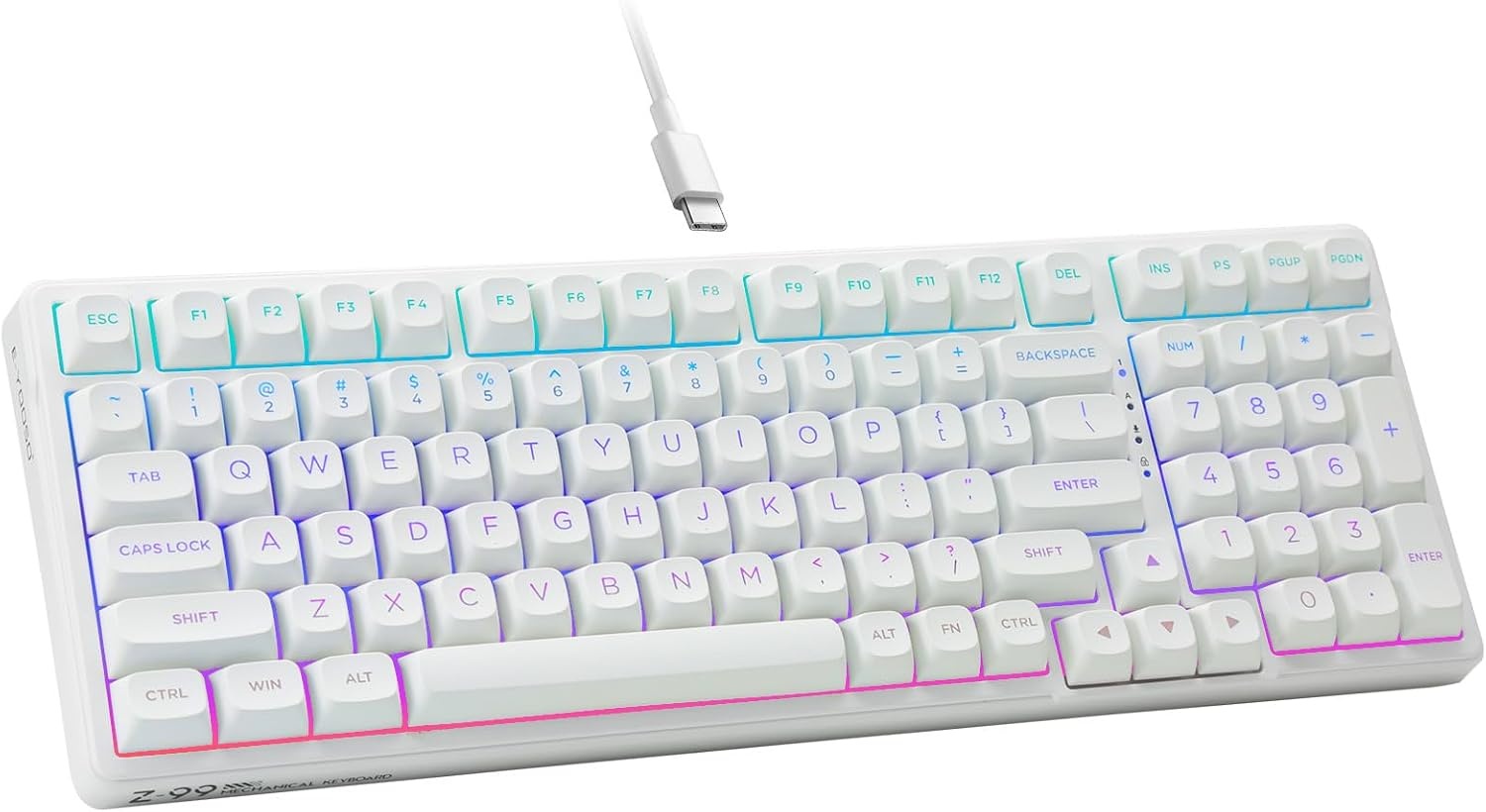
Budget pick: HUO JI E-Yooso Creamy Mechanical Keyboard Wired, RGB Backlit, White
 Visit on Amazon →
This is the board I point first-time buyers at when they tell me they want to spend as little as possible and still get something that behaves like a real mechanical keyboard. Wired, RGB backlit, white, and unapologetically aimed at the entry tier. Check current Amazon price before you commit, because this is exactly the price band where the numbers move around and where a sale changes the math.
What matters at this tier is not the switch brand printed on the box. It is whether the board does the boring things right. Does the case flex when you press the spacebar? Does the spacebar rattle? Does the cable connect with USB-C or with some proprietary nonsense? Those three questions separate a good budget board from a bad one far more reliably than the switch name does.
Flaws but not dealbreakers: Budget boards almost always need a stabilizer tune. If your spacebar rattles, that is not a defect, it is a design decision, and it means nobody at the factory pressed the spacebar twice before shipping it. The fix costs a few dollars in lube and an afternoon.
Anyone buying their first mechanical keyboard, or buying a second board for an office, should start here.
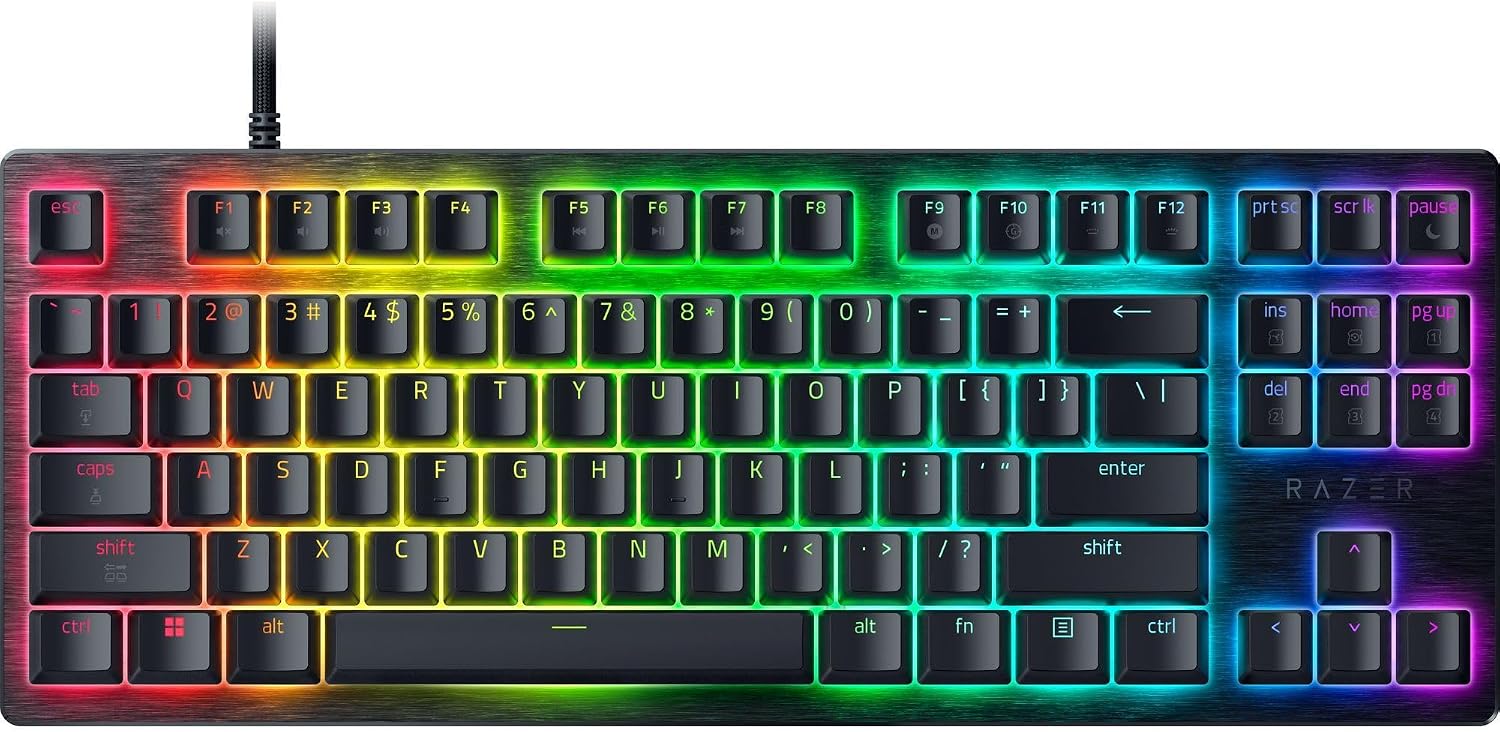
Upgrade pick: Razer Huntsman V3 HE Magnetic TKL 8KHz Wired Gaming Keyboard
 Visit on Amazon →
This is the other end of the ladder: a tenkeyless, wired, Hall Effect board with magnetic switches, adjustable actuation, and an 8 kHz polling rate. Check current Amazon price, because this tier is where the sticker moves most often.
Here is my honest read on magnetic switches for typists, which is the question I get asked most. Adjustable actuation and rapid trigger are real technologies, and they are genuinely transformative for competitive shooters, where the reset point of a key is the difference between a counter-strafe and a death. For writing code and prose, that advantage mostly evaporates. You are not lifting your finger mid-keystroke to gain a frame. What you do get is a board with a very consistent, very smooth press, and if you like a light, linear, frictionless feel, that consistency is worth something on its own.
The tenkeyless layout is the part I would argue about. Dropping the numpad buys you desk space and pulls your mouse hand closer, which is good. It also removes the keypad I use for hex literals and port numbers roughly four times a day, which is annoying enough that I keep a separate pad on the shelf.
Flaws but not dealbreakers: An 8 kHz polling rate is a specification aimed at esports, and it is not going to make your git commits faster. If you are buying this strictly for writing, you are paying for headroom you will not use. If you split your time between code and shooters, this is one of the few boards that does both without compromise.
Anyone who games seriously and codes professionally, and wants one board instead of two, should look here.
The actual selection workflow
Now the part you came for. Run these in order. Do not skip ahead to the switches, because a great switch on the wrong layout is still the wrong keyboard.
Step one: Layout. Decide whether you need a numpad, function row, and arrow keys, and whether you need them all the time or occasionally. Full-size, tenkeyless, 75 percent, and 65 percent are the four you will realistically choose between. If you use Excel or a terminal with hex values daily, buy the numpad. If you do not, the desk space and the shorter reach to your mouse are worth more than the keys you would have used twice a month.
Step two: Switch type. Three families, and the decision is simpler than the hobby makes it sound. Linear switches travel straight down with no bump. Tactile switches have a bump at the actuation point, which gives your fingers feedback that the press registered. Clicky switches add a click, and you cannot use them in an open office or on a call, no matter how much you love them. I say that as someone who loves them. If you type in a shared space, buy tactile and be at peace.
Step three: Actuation weight, not actuation point. A 2 mm actuation point is the industry default and it is fine. What actually tires your hands over an eight-hour day is the force required, usually somewhere between 45 and 60 grams. If you have any history of hand or wrist discomfort, err lighter. Lighter springs are not "cheaper," they are a fit decision.
Step four: Hot-swap sockets. This is non-negotiable in 2026. If a board does not have hot-swap sockets, it is obsolete the day you open the box, because you cannot change a single switch without a soldering iron. Also check that the sockets accept both 3-pin and 5-pin switches. A board that only takes 3-pin switches is a board that quietly limits every future purchase you make.
Step five: Firmware. VIA and QMK support is the difference between a keyboard and a keyboard you own. Remapping caps lock to escape, moving the arrow cluster, building a macro layer for your editor: all of that happens in firmware, not in a driver. RGB software that requires an account login just to change a color is a war crime, and I will not be talked out of that position.
Step six: Stabilizers. Press the spacebar twice in a quiet room. If you hear a rattle, it will still be rattling in week four, because rattles never lube themselves. This is the single most common failure on boards that cost real money, and it is the first thing I check on any board over the budget tier.
Step seven: Connection and polling. Wired means wired: a detachable USB-C cable is the standard you should demand, and USB-A-only cables belong in a drawer. Polling rate matters far more to competitive games than to typing. If you write for a living, a standard polling rate is invisible to you.
Step eight: The 30-day test. Buy from somewhere with a real return window, then use the board for a month before you decide you love it. Day one is the unboxing. Day thirty is the truth. The best keyboard is the one you stop noticing, and if you are still thinking about the board in week three, it failed.
What I left off this list
Wireless boards are not here on purpose. Wireless is finally good, and I use it, but latency and drop-free weeks are the features, not the word "wireless" on a box. If you are on call and your keyboard is also your lifeline, a cable is one fewer thing that can fail at 2 a.m.
Ortholinear and split layouts are not here either. They are genuinely better for some hands and some shoulders, and I still cannot touch-type on ortholinear, which I say in every ortholinear-adjacent review I write. Do not let a stranger on the internet talk you into relearning how to type as a first purchase.
Group buys are not here because I do not review boards you cannot buy tomorrow. A keyboard that ships in fourteen months is a promise, not a product, and the hobby's obsession with scarcity is a trap.
What this all costs
The two boards here bracket the range, and the honest version is that the cheaper one will do 85 percent of what the expensive one does for typing. The expensive one earns its place if you game competitively, if you want adjustable actuation, or if you simply want the consistency that magnetic switches deliver. Check current Amazon price on both before you decide, because the gap between tiers moves.
The extras are where people overspend. A keycap puller and a switch puller are a few dollars and last forever. A tube of dielectric grease for stabilizers costs less than a coffee. A set of switch films is optional. None of that is required to enjoy a board, and all of it is cheaper than the second keyboard you buy because you picked the wrong layout the first time.
Do the layout and switch decisions once, buy the board that fits them, and then stop shopping. That is the whole trick. Your keyboard should disappear under your hands, and the only way to know whether it will is to give it thirty days and count what you noticed.