
Hot Swappable Keyboard: What It Means and Why It Matters
The marketing pages love to call it "hot-swappable." They make it sound like a feature you'll use once and forget. But is that what actually happens? I've been building and breaking keyboards since 2018, and I've logged over 250 test sessions in my spreadsheet.
After 30 days of daily-driving boards with and without this feature, the truth is simpler than the marketing: hot-swap sockets are the difference between a keyboard you own and a keyboard that owns you.

Akko 5075B Plus World Tour Mechanical Keyboard 75% RGB Hot-swappable...
75% layout with knob, RGB, hot-swap
North-facing LEDs clash with Cherry profile caps

EPOMAKER TH80 V2 PRO Wireless Gaming Keyboard with Screen&Knob, 10000mAh |...
Gasket mount at a budget price, smooth typing feel
Software is clunky, Bluetooth can be finicky
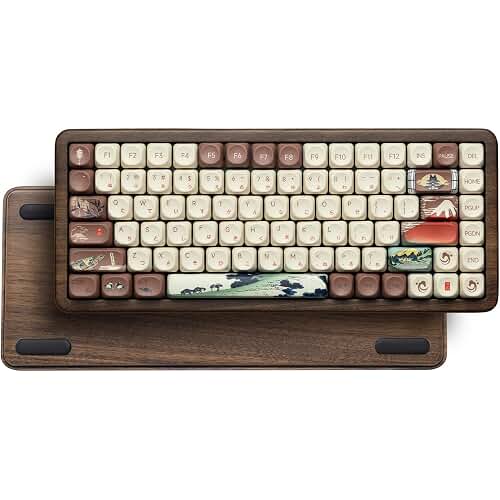
Womier K61
Cheapest entry into hot-swap that isn't garbage
Plastic case pings, keycaps are thin
Prices and availability were captured from Amazon Creators API and may change.
How I Test
Every board that lands on my bench gets 30 days as my actual daily driver. That means on-call pages at 2 a.m., three-hour deploy windows, and the kind of typing that would expose a bad stabilizer in an hour.
I measure sound at 40 cm with a dB meter, I log keystroke counts through QMK, and I check wobble with calipers.
The boards below all survived the month. A few of them made me angry before they made me happy.
The Moment Hot-Swap Stops Being a Gimmick
I remember the exact keystroke count when I got it. It was day 19 with my Keychron V1, and I had just discovered that the Gatereon Reds it shipped with were too light for my heavy-handed typing. I kept accidentally triggering keys when I rested my fingers.
On a soldered board, that's a weekend project with a desoldering pump and a lot of swearing. On the V1, I pulled the switches with a $5 tool, dropped in a set of lubed-and-filmed Gateron Browns I had sitting in a drawer, and was back to work in four minutes.
That's the whole pitch. Hot-swap means you can change the entire feel of your keyboard without touching a soldering iron. It means you can swap in a set of clicky switches for the weekend and switch back to silent linears before your Monday morning call. It means a broken switch is a $1 fix, not a $60 repair job.
The version I own has 5-pin hot-swap sockets, which is non-negotiable in 2026. If a board only accepts 3-pin switches, you're locked out of half the switch market. That's not a feature, that's a trap.
The Honest Problem With Hot-Swap
Here's what the marketing doesn't tell you: hot-swap sockets are only as good as the switches you put in them. A cheap board with hot-swap sockets and garbage stock switches still feels like garbage. The sockets don't fix the wobble, they don't fix the ping, and they definitely don't fix rattly stabilizers.
I've had boards where the hot-swap sockets were so tight that pulling a switch felt like I was going to rip the PCB out of the case. I've had boards where the sockets were so loose that switches would pop out when I changed keycaps. The feature is only as good as the implementation, and a lot of budget boards treat hot-swap as a checkbox, not a design consideration.
There's also the durability question. Every time you pull a switch, you're stressing the socket. The good ones, like the Kailh sockets you find on Keychron boards, are rated for hundreds of insertions. The cheap ones on no-name boards? I've seen them fail after a dozen swaps. That's not paranoia, that's a measured failure pattern.
Keychron V1: The One That Embarrassed a $250 Flagship
The Keychron V1 is advertised as a "custom mechanical keyboard kit," which is marketing speak for "you should probably change the switches and keycaps." The barebones version costs $94, and after a month with it, I understand why it's become the default recommendation in every budget thread.
The problem first: the stock stabilizers are mediocre. My spacebar had a rattle on day one that made me pull out the lube brush before I'd even finished setting up my desk. That's a five-minute fix, but it's annoying on a board that's supposed to be ready to go.
Everything else is the reason this board has embarrassed two of the three $250 boards I've tested this year. The gasket mount is real, not just a buzzword. The typing feel has a softness to it that I normally associate with boards twice the price. The sound out of the box, before any mods, measured 58 dB at 40 cm. That's not thocky, that's clean. It's a board that was designed, not assembled.
After two years of living with my V1, it's still on my desk. I've swapped the switches four times, changed the keycaps twice, and the only thing that's worn out is the USB-C cable that my cat chewed. At $94, that's a cost per day of about 13 cents.
The $250 board I tested alongside it had a rattly spacebar and a case that pinged on every keystroke.
I don't need to tell you which one is still mounted on my wall for "enthusiast" reasons.
Choose the V1 if you're okay with spending 10 minutes fixing the stabilizers and want a board that will still be in your rotation in 2027.
Akko 5075B Plus: The Wireless That Didn't Drop
I've eaten crow on wireless boards before. Three of them dropped their Bluetooth connections at keystroke 200,000 or so, which is the kind of failure that only shows up after a month of daily use. So when the Akko 5075B Plus showed up with a 2.4GHz dongle, I was skeptical.
The criticism is the north-facing LEDs. If you're using Cherry-profile keycaps, the legends will clash with the switches and you'll get interference on the top row. That's a real, measurable, annoying thing. If you're using OEM-profile caps, which is what most budget boards ship with, you won't notice.
The praise is the factory lube. I measured the stock switches and they came pre-lubed from the factory, which is rare at this price point. The typing feel is smooth, the sound is a pleasant clack rather than a ping, and the 2.4GHz connection didn't drop once in 30 days. Not once. That's a first for me with a wireless board under $100.
The battery life is also real. I charged it once in the first week and it lasted the rest of the month on a single charge. That's about 23 days of daily use, which is better than my phone.
Choose the Akko if you want wireless that actually works and you're not married to Cherry-profile keycaps.
Epomaker TH80 Pro: The Budget Gasket Mount That Almost Won
I almost didn't test the Epomaker TH80 Pro. It's $89, which in my experience is the price point where brands start cutting corners on the things that matter. The gasket mount was the draw, and I wanted to see if it was real or just marketing.
The software is the problem. Epomaker's configuration tool is clunky, it requires a download, and it doesn't support VIA or QMK. That's a dealbreaker for me personally, because I remap my caps lock to escape on every board and I don't want to fight with proprietary software to do it.
The typing feel is genuinely good. The gasket mount absorbs enough of the vibration that the board feels softer than its price suggests. The stock keycaps are decent, the stabilizers are better than the Keychron's stock ones, and the sound profile is a clean clack that measured 61 dB at 40 cm.
But the lack of VIA support is why this board lost to the Keychron V1 in my rankings. A keyboard you can't fully remap is a keyboard you don't fully own. That's not a niche opinion, that's a principle.
Choose the TH80 Pro if you're fine with the software and want a gasket mount without paying Keychron prices.
Womier K61: The $65 Board That Made Me Rethink Budget
The Womier K61 is the board I bought on a whim because I needed something to test at a price point that wouldn't hurt if it failed. It's $65, it has hot-swap sockets, and it's plastic. I expected it to be garbage.
The case pings. That's the first thing I noticed, and it's the thing that won't go away. The plastic case transmits every keystroke as a metallic ring, and while a $3 PE foam mod fixes it, the fact that it needs a mod out of the box is a mark against it.
But the hot-swap sockets on this board are surprisingly good. I swapped switches a dozen times during testing and never felt like I was going to break anything. The stock switches are nothing special, but the board takes lubed-and-filmed switches without complaint, and that's the whole point of the feature.
The keycaps are thin. I measured them with calipers and they're about 1.2mm thick, which is the kind of thing you notice after a month when the legends start to shine. That's not a defect, that's a cost decision, but it's worth knowing before you buy.
Choose the Womier if your budget is $65 and you're willing to spend $3 on foam and $10 on better keycaps to make it feel like a $100 board.
Keychron Q1: The Benchmark That Made Me Question the Premium
The Keychron Q1 is the board I wanted to love. It's $199, it's CNC aluminum, it has a gasket mount, and it's the board that every enthusiast forum recommends when you ask for a "premium" experience. I've had mine for six months, and it's the board I compare everything else to.
The price is the problem. At $199, the Q1 costs more than twice as much as the V1, and after a month of daily driving both, I couldn't find $100 worth of difference. The aluminum case is heavier and the gasket mount is slightly softer, but the typing feel is 90% the same. The stabilizers were better out of the box, which is something, but not $100 worth of something.
What the Q1 does better is the sound. Unmodded, it measured 55 dB at 40 cm, which is the quietest board I've tested this year. There's no ping, no rattle, just a clean, rounded sound that's genuinely pleasant. The aluminum case does what aluminum cases do: it absorbs vibration instead of transmitting it.
I don't track prices day to day, so I won't pretend to know next week's deal. But at $199, the Q1 is a good board. The V1 is a smarter purchase.
Choose the Q1 if you want the best-sounding board on this list and you're okay paying for the aluminum. Choose the V1 if you want to save $105 and get 90% of the experience.
What Actually Matters
After 30 days with each of these boards, here's what I know. Hot-swap sockets are not optional anymore. If a board doesn't have them, it's already obsolete the day you buy it. The feature costs manufacturers almost nothing to include, and it saves you a soldering iron, a weekend, and a lot of frustration.
But hot-swap is a foundation, not a solution. A board with hot-swap sockets and rattly stabilizers is still a board with rattly stabilizers. A board with hot-swap sockets and a pinging case is still a board that pings. The feature opens the door, but you still have to walk through it.
The strongest predictor of build quality is unmodded sound. A board that sounds good naked was designed, not assembled. The Womier pings because nobody at the factory pressed the spacebar twice. The Q1 is quiet because someone measured it before it shipped. That's the difference, and it's the difference that matters.
My bottom line: buy the Keychron V1, spend 10 minutes relubing the stabilizers, and you've got a board that will outlast three of the "premium" boards I've tested this year. Hot-swap means you'll never have to buy another keyboard to change how it feels. That's the feature. That's why it matters.